 CleanYourTV
CLEANYOURTV · TV troubleshooting
Android TV launcher keeps stopping: diagnose the Home failure
When an Android TV launcher keeps stopping, first identify the device and application producing the error. A television, an HDMI box and a streaming app can fail in different ways. The next step depends on whether Home, Settings or another app still works.
This guide helps you choose supported recovery controls or leave with a useful support record. The conditional steps below follow current Google, Sony and Projectivy documentation. They were not executed on a crashing television. The worked example reconstructs a historical public report; it does not claim to reproduce or repair that owner's fault.
Jump to device identity, classification, responsive devices, Home recovery, frozen devices, verification, support record or FAQ.
Identify the device and preserve the error
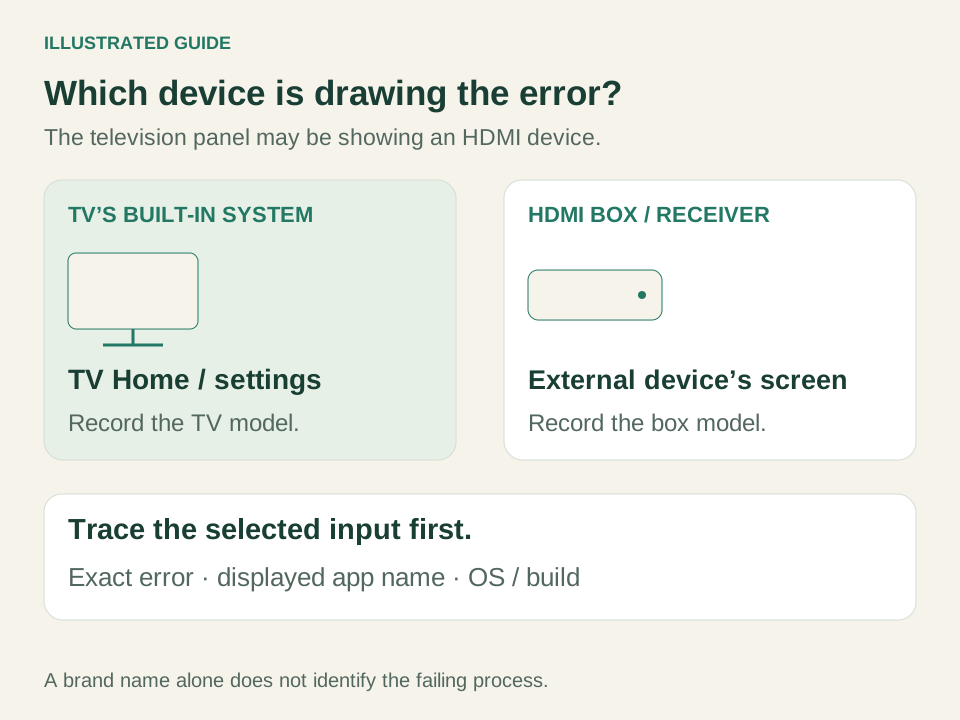
If your Android TV launcher keeps stopping, establish whether the television itself or a connected Android box draws the message. Note the selected input and which remote controls the failing interface. A message seen through HDMI does not automatically belong to the television's operating system.
For example, “mediabox launcher has stopped” needs the box's identity before you choose its manufacturer instructions. Do not infer a package name from a television brand or download a similarly named launcher as a repair.
Write down:
- Device model, Android version and firmware/build, when accessible.
- Exact error text, visible app name and app version if its details open.
- What happened immediately before it: startup, Home, leaving an app or ordinary viewing.
- Whether Home, Settings, Input and another app respond.
- Recent updates, launcher changes and any saved original-Home restoration record.
Keep unavailable fields as unknown. A photo of an “Android TV launcher has stopped” message is useful, but does not identify the underlying cause. Searches such as “leanback launcher has stopped android tv” also need the actual displayed name and version; a search phrase is not a verified package identifier.
Classify the failure before changing Home
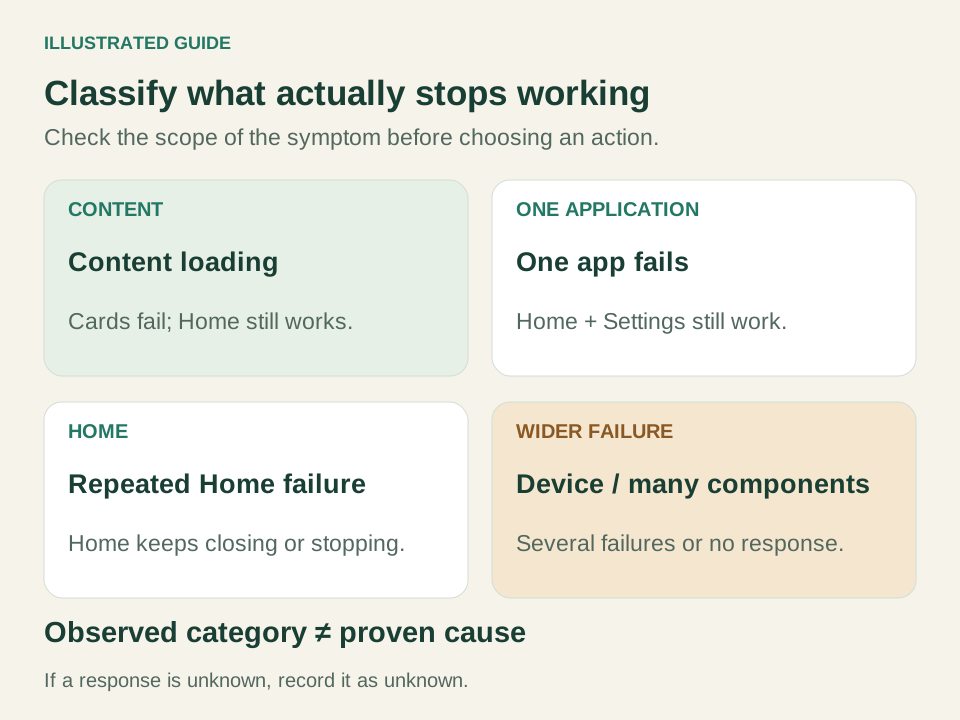
When an Android TV launcher keeps stopping alongside several system components, avoid treating every popup as an independent app problem. Use the observable behavior to select a branch.
| Pattern | Appropriate next check |
|---|---|
| Content will not load | Home navigation and Settings work, but recommendations or one service fail. Check that content/service separately. |
| One app fails | Home and another app work. Identify the failing app and its available controls. |
| Home repeatedly fails | Returning Home or leaving an app repeatedly triggers the problem. Record the Home app and recent changes. |
| Wider or unresponsive failure | Several components fail, or navigation stops. Record which controls still respond; use the named-device restart route when unresponsive, otherwise preserve those observations for support. |
An Android TV launcher crash loop describes repetition; it does not prove that the whole device is rebooting. Record whether you see a startup animation, repeated app errors or simply a blank Home screen.
Similarly, if Google TV Home keeps crashing while another app remains usable, preserve that working route. Missing recommendations, slow navigation and an application that never installed are different tasks. The Home customization overview explains the wider layout choices once the interface is usable.
Use app controls only while the device responds
If your Android TV launcher keeps stopping but Settings still opens, record the identified app's version before changing anything. Keep a way back to a working interface. Do not uninstall or disable system Home to see what happens.
Google's app-crash instructions describe checking updates in Play Store through the profile menu, Manage apps & games → Updates. Check available updates and record what actually changes. System updates are separate and should follow the device's own instructions.
For an identified app, Google documents Settings → Apps → the app → Force stop → OK. Sony's current app guide also describes Force stop through app information or Settings, depending on the TV menu, followed by reopening the app.
Use that branch only if the correct target and control are accessible. After reopening, repeat the action that caused the error. If the button is absent, the target is uncertain or opening Settings fails, stop and record that limit. Do not substitute a shell command against a guessed system package.
Clearing cache, clearing app data and stopping an app are different actions. Data removal can discard settings or sign-ins. Do not clear every system component, remove the only Google account or reset the TV as a harmless continuation of Force stop.
Return from a third-party Home within its limits
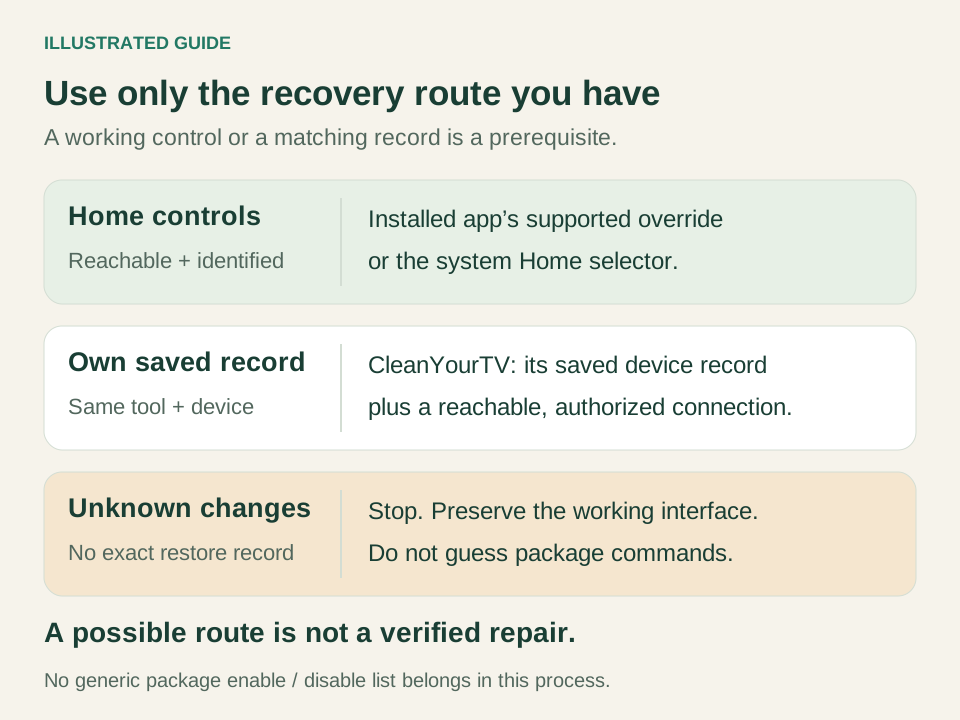
When an Android TV launcher keeps stopping after a Home replacement, preserve the original interface and determine how the replacement was selected. An app's supported override, a system Home selector and a tool that disabled stock Home require different recovery routes.
| Route | Recovery boundary |
|---|---|
| Projectivy | Undo its supported override or return through an available system selector. Keep the original Home installed and usable. |
| CleanYourTV | Use its own saved record for the matching device and Android user, with a reachable authorized connection. |
| Another tool changed stock Home | Retrieve that tool's exact change/restore record. Do not guess which package to enable or disable. |
| Stock Home itself fails | Changing selection cannot establish or repair the underlying cause. Preserve evidence for device/app support. |
Projectivy 4.73 was released on October 31, 2026. Its official documentation describes launcher override and setup, but this guide does not claim a verified button-by-button reverse path for that version. Use the controls actually exposed by your installation; if they are inaccessible, retain that fact in the support record.
For CleanYourTV, follow the original-Home restoration guide only when its saved device record exists. A working connection alone does not create a missing record or undo another tool's unknown changes.
Existing official API31/36 emulator QA verified limited CleanYourTV app-opening, Home-settings intent and saved-record restoration behavior while stock Home remained available. It did not repair a crashing Home, exercise Projectivy's controls or prove manual selector operation.
Follow the named device's restart instructions
If your Android TV launcher keeps stopping and the device no longer responds, use the manufacturer instructions for that identified model and region. A normal restart, unplugging the device and a factory reset are separate procedures.
Google's unresponsive-device guidance includes a power-disconnection route. Sony's restart guide gives model-dependent remote/menu options and a power-reset procedure. Follow the matching instructions instead of combining their timings into one universal TV recipe. If the power connection is inaccessible, do not improvise.
After the device returns, check the original trigger and usable controls. If it remains unusable, record the attempted restart and result for support. Repeating an unsuccessful reset indefinitely provides no verified recovery.
Factory reset is a later, explicitly data-erasing manufacturer option. Google also warns that removing the only Google account can automatically reset the device. Neither action belongs in an ordinary “try stopping the app” step. Preserve your evidence and understand the model-specific consequences first.
Verify the same trigger and choose an honest result
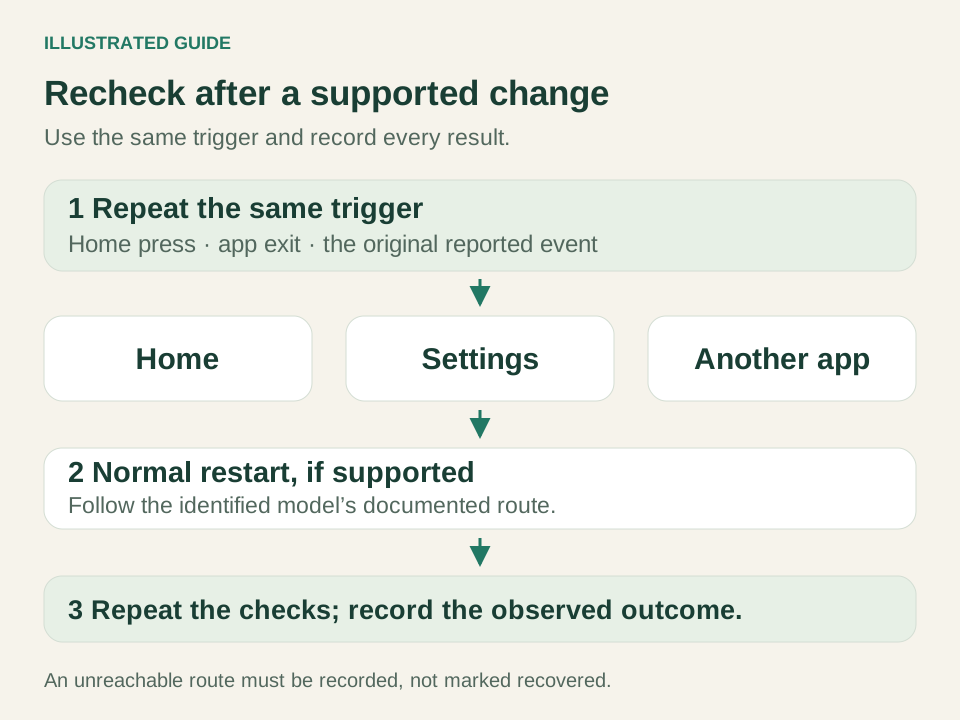
If the Android TV launcher keeps stopping again, the recovery check has failed even if one screen briefly opened. After any supported change, repeat the original Home or app-exit action, open another app, check Settings and perform a normal restart before checking again.
Keep the test consistent. For an “Android TV Home keeps crashing” report, opening a different streaming app once is not the same test as returning Home from the original app. Note the change, time, result and any new error.
Use one of three outcomes:
- Recovered Home: the original trigger no longer fails and Home, another app and Settings remain usable after restart.
- Contained third-party fault: a supported return to a working Home is verified; the failing third-party app still needs investigation.
- Unresolved device/system fault: controls are unavailable, symptoms persist or evidence is insufficient. Keep the exact limitation and a support record.
A report that another launcher “feels better” does not establish the cause. No physical-TV recovery or performance comparison was performed for this guide.
Turn an unresolved problem into a useful support record
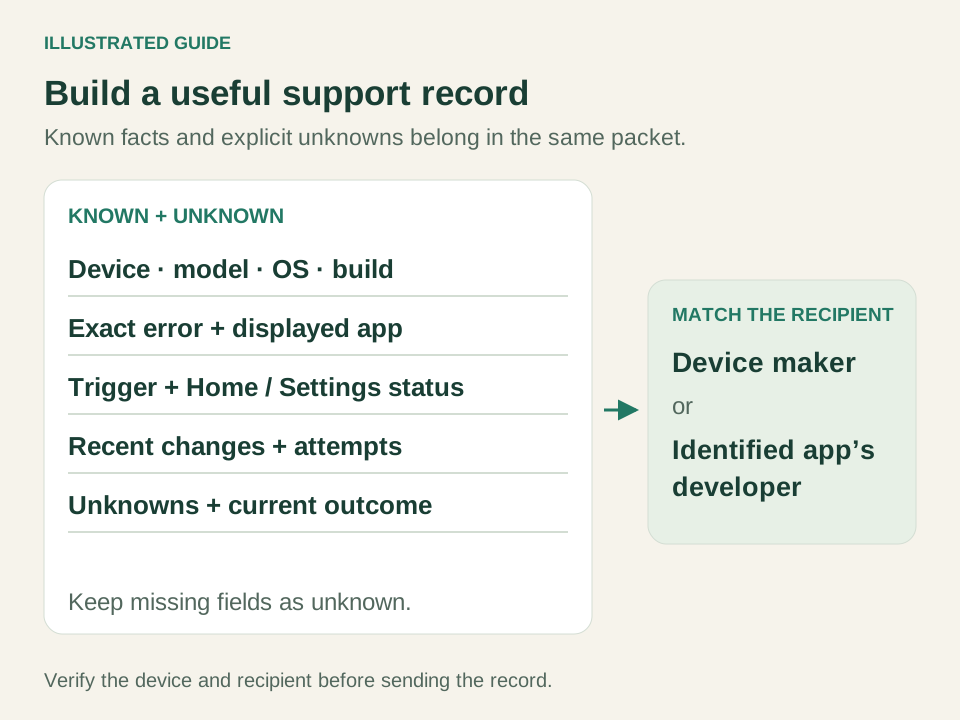
If your Android TV launcher keeps stopping and supported recovery is unavailable, send the device manufacturer or identified app developer a concise record. Include what happened, what you tried, the result and what you could not access. Keep passwords and account details out of shared pictures.
The Sony community report from March 16, 2017 provides a concrete example. Its multiple-component symptoms belong in the device-support branch. The following filled record reconstructs the public report; it is not a ticket submitted by us:
Device: Sony XBR-65X810C. Historical public report, not a device examined by this project. Android version, firmware, component versions and current Settings access: unknown. During TV viewing, the owner reported errors involving Program Guide, InteractiveTVPlatform, Watch TV, AtscTunerService, Leanback Launcher and com.sony.dtv.enclave.service. Dialogs reportedly resisted dismissal for 2–5 minutes, with 3–5 incidents during a three-hour event. Unplugging and factory resets reportedly helped only slightly. No root cause or recovery is verified. Requested next evidence: build/version when accessible, an error photo and timestamp, and whether Home, Settings, Input and another app respond. Please review the multi-component failure; repeated data-erasing resets and guessed package changes are not proposed. Force stop and third-party Home recovery were not tested by this project.
For your own record, replace historical details with your observations. Keep unknown fields visible rather than inventing a build or successful test. Add recent changes and the location of any original-Home restoration record. A manufacturer can receive an initial report even when the failing interface prevents collecting every field.
Android TV launcher keeps stopping FAQ
Will installing another launcher fix it?
When an Android TV launcher keeps stopping, a replacement may offer another interface, but does not establish the cause or guarantee system recovery. Preserve the original Home and its recovery route. Buying CleanYourTV or Projectivy Premium is not required to make a diagnostic record.
What if the problem began after an update?
If your Android TV launcher keeps stopping after an update, record the app and firmware versions and when the symptom began. Timing is useful evidence, not proof of the responsible component. Use available official updates or supported app controls, then repeat the same trigger.
Should I reset before contacting support?
You can report an unresolved fault with missing fields and failed attempts clearly marked. Consult the identified manufacturer's instructions before any data-erasing procedure. If a previous reset already failed, include that result instead of treating another reset as a guaranteed repair.
INDEPENDENT READING
Review Home choices once the interface is usable
Use the Home customization overview to compare layout options while preserving a working original interface and its recovery route.
Review TV Home options →Sources and review notes
Google TV: app-crash updates, Force stop and developer support ↗Google TV: unresponsive-device recovery and reset consequences ↗Sony: BRAVIA application controls, updated June 17, 2026 ↗Sony: restart, power reset and factory reset, updated September 29, 2026 ↗Projectivy official features and support information ↗Projectivy 4.73 release, October 31, 2026 ↗Historical Sony XBR-65X810C community report, March 16, 2017 ↗Checked November 1, 2026 against current Google and Sony support instructions and Projectivy 4.73. The worked Sony example reconstructs a public report dated March 16, 2017; its fault was not reproduced or repaired by this project. Conditional Force stop, Projectivy reversal, manual Home selection and manufacturer power-cycle steps were not executed on a failing TV. Earlier official Android TV API31/36 emulator QA covered limited CleanYourTV app opening, Home-settings intent and saved-record restoration while stock Home remained available; it does not prove crash recovery. All six images are conceptual or illustrated guides, not actual crash captures.